
Cohort reports make it easy to:
-
Identify who has completed the most recent assessment.
-
Review top strengths and focus areas for each learner.
-
Understand the overall skill profile of the cohort.
-
Track incomplete learners who have not yet completed their latest assessment.
How to Generate a Report
-
Access the Cohort Report Tool
-
Open the tool from your admin or facilitator dashboard.
-
You’ll be prompted to enter a few key details.
-
-
Fill Out the Required Fields
Field Description Your Name Enter your full name. This will appear on the generated report. Email Enter the email address associated with the specific cohort or classroom. Cohort ID The name of the cohort. Example: Workplace001 Date Range Choose the From and To dates (inclusive). Only assessments taken within this period will be included. 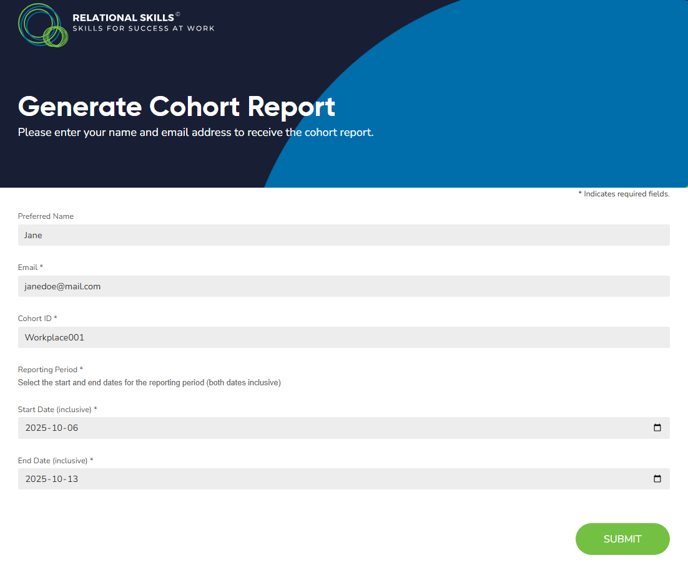
-
Click Submit
-
The system will process generate a Cohort Report PDF and send it to your email address connected to the cohort
-
Understanding the Report Sections
1. Cohort Overview
On the first page of the report, you’ll see:
-
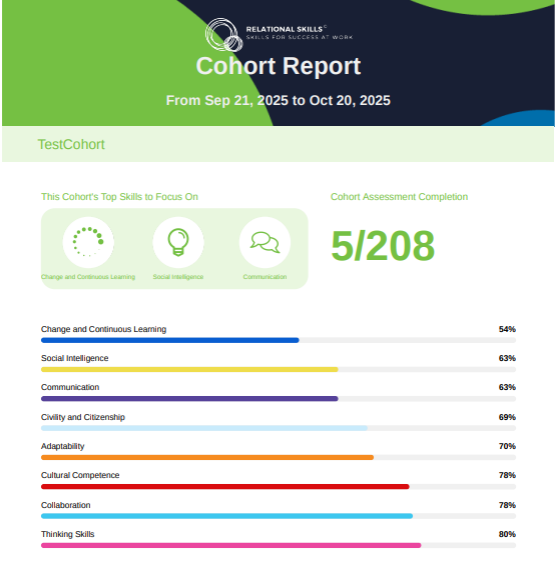
The date range of the data collected
-
The cohort name (e.g., TestCohort)
-
The average score for each of the eight core skills:
-
Thinking Skills
-
Social Intelligence
-
Communication
-
Change and Continuous Learning
-
Collaboration
-
Adaptability
-
Civility and Citizenship
-
Cultural Competence
-
This section highlights the top three skills to focus on for the entire cohort. These are the lowest average skill areas that may benefit from additional coaching or microlearning support.
2. Assessment Response Summary
This section breaks down responses per skill category, showing how learners rated themselves across survey questions (Strongly Agree → Strongly Disagree).
This allows facilitators to analyze patterns in confidence and consistency across skills such as Adaptability, Thinking Skills, and Social Intelligence
3. Student List Summary
This section shows a list of the students in the cohort divided by learners that completed the an assessment report within the given date range. Learners under Incomplete Learners/Report show:
-
Students who have not completed their most recent assessment.
-
The cohort they were originally part of, which is especially helpful if learners were moved between cohorts or sessions.
This ensures accountability and easy follow-up with learners to improve participation rates
4. Individual Student Reports
Each learner’s section includes:
-
The date and time they completed the assessment within the date ranges selected to generate the report
-
Their individual skill scores shown in percentages
-
Personalized feedback and improvement tips for each skill
For example:
“You are great at communicating with your peers. To enhance this skill, work on your body language and seek feedback from trusted colleagues.”
This enables targeted coaching at both the individual and group levels.
Troubleshooting
| Issue | Possible Cause | Solution |
|---|---|---|
| Report shows incomplete data | Incorrect date range or email entered | Double-check both fields and re-run the report |
| Learners missing under “Completed” | They may have taken assessments outside the selected date range | Extend the “To” date or verify submission times |
| Duplicate names | Learners may exist in multiple cohorts | Verify their assigned cohort in the LMS |