![iblum_Icon_RGB.png]](https://help.iblum.co/hs-fs/hubfs/iblum_Icon_RGB.png?height=40&name=iblum_Icon_RGB.png)
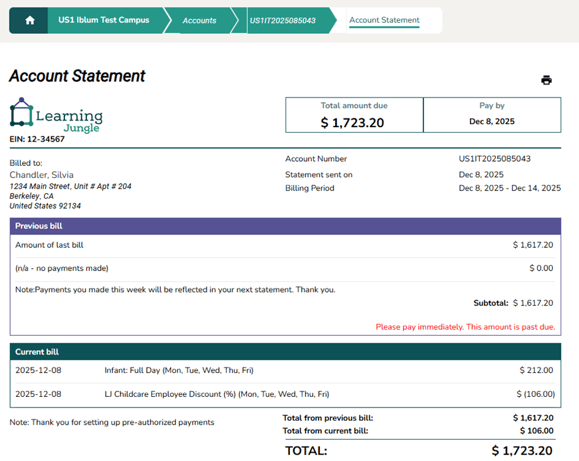
The statement summarizes:
- Previous charges still owing
- New charges for the current billing week
- Total amount due and the payment deadline
- Any notes related to payments or pre-authorized debit (PAD)
You can view and print your statement directly from the Parent Portal.
Account Statement Overview
Header Section - At the top of the statement, you will see:
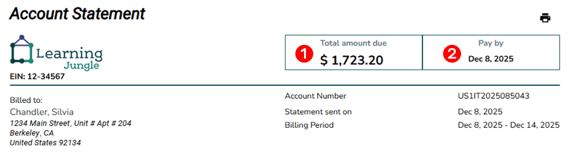
- Total Amount Due - Shows the full balance currently owing on your account.
- Pay By Date - Indicates the deadline for payment. If the date has passed, the system may highlight the notice in red.
Billing Information - This section displays important account and billing details:
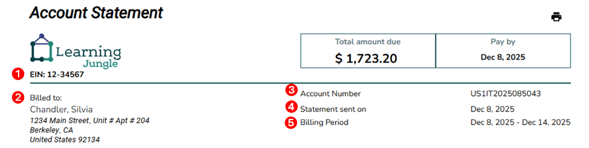
- EIN Number - business tax identifier for Learning Jungle.
- Bill To: Primary Parent / Guardian name and mailing address.
- Account Number: Your unique family account ID in the system.
- Statement Sent On: Date the statement was generated.
- Billing Period: The week the charges apply to.
Previous Bill Section - This area summarizes any outstanding charges from your last statement:
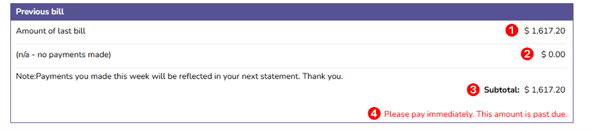
- Amount of Last Bill - Shows the remaining balance from the previous week.
- Payments Made - Displays payments received since the last billing cycle. If no payments were made, it will show $0.00.
- Subtotal - Shows the total unpaid amount that has carried over.
- Reminder - If the balance is overdue, a red message will appear: “Please pay immediately. This amount is past due.”
Current Bill Section - This section lists new charges added for the current billing period. Each line includes:

- Date of charge
- Program or fee/discount name - e.g., Infant: Full Day or Employee Discount.
- Charge or discount amount - Discounts appear in parentheses e.g., ($106.00).
Statement Totals - At the bottom right of the statement:
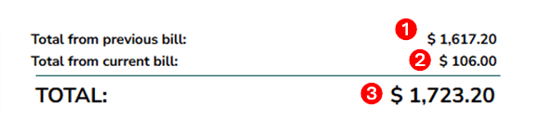
- Total from previous bill: Any unpaid amount from last week
- Total from current bill: Charges for the current week
- TOTAL: Combined amount that must be paid by the due date
Explanation of Amounts
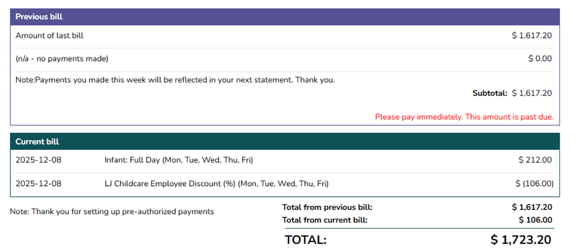
Previous Bill: $1,617.20 - Carried over from last week with no payments applied.
Total Current Bill: $106.00 - including $212.00 program fee and ($106.00) employee discount.
Final Total Amount Due: $1,617.20 + $106.00 = $1,723.20.
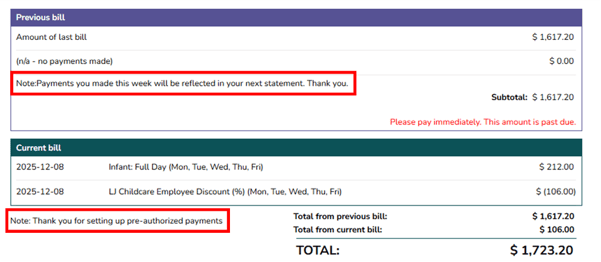
Notes - The statement may include helpful reminders, such as:
- Notification that payments made mid-week will appear on the next statement.
- Confirmation of pre-authorized payments.
Action Buttons
Printer Icon - Opens your browser’s print dialog. Allows you to print or save the statement as PDF.
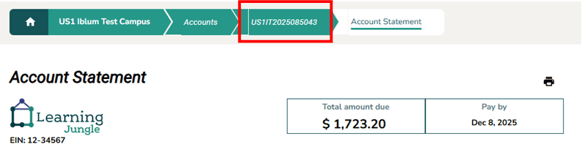
Back to Account - Clicking your account number in the breadcrumb returns you to your main account page.