![iblum_Icon_RGB.png]](https://help.iblum.co/hs-fs/hubfs/iblum_Icon_RGB.png?height=40&name=iblum_Icon_RGB.png)
The iBlum Seach Function

The search bar is located at the top of every page and may be used at any time to search for accounts and members (parents, students, and teachers) by name, account number, or Employment ID, where applicable. It also does partial match search, thereby allowing any account that matches by name or number shows up.
⚠️IMPORTANT: Searches for teachers may be performed only by users with Director access or higher and must be conducted using Employment ID, as account numbers do not apply.
Search by NAME
When you search for a name using non-numeric alphabetical characters (case insensitive), it can search partial match from single character and up to any number of characters, including words separated by white space. This kind of search allows to find whole and partial matches of the words you entered.
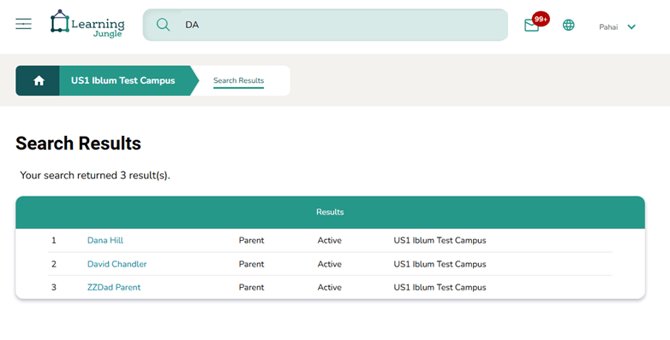
Example 1: The search below was for all names have a DA in them, results in 3 accounts with “da” in their names
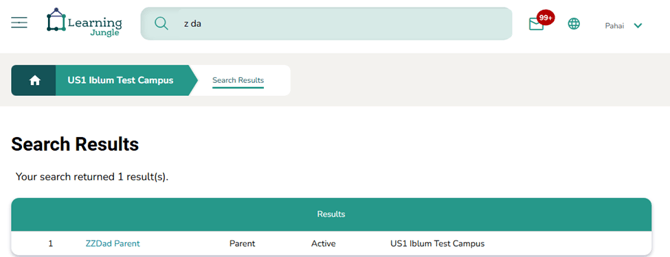
Example 2: Searching for names with two tokens, such as Z and DA in them narrows the number of qualifying values to one
Search by NUMBER (at least last 4 digits)
When you search by account number or Employment ID, you need to provide at a minimum the last four digits.
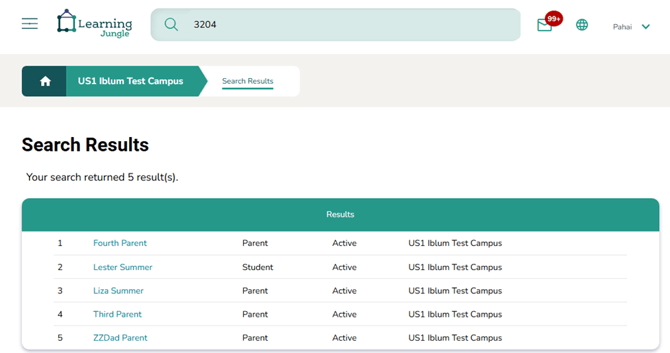
Example: When you search for 3204, then every individual (parent or child) associated for the account with last four digits of 3204 is listed, along with their role, whether they’re active, and the name of the facility.
Search results
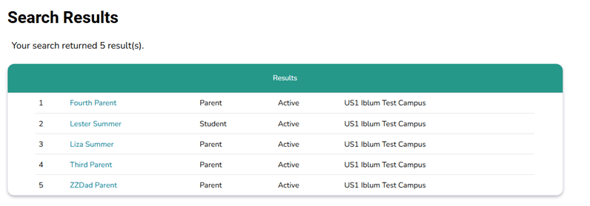
Regardless of search by name or number, the search results are identical. The results show a row of names that match the criteria, where each individual name is a hyperlink, and takes you to the account detail page for the account (parents or student) or employee details (for teachers).
In the search results example above: all the five hyperlinks, since it is related to the same account, any link will take you to the same account details page.
✅ Important use cases:
- Search for a single family when you only remember their partial name. If the partial name matches several families, then you will see all their names listed
- Search for several families who have a certain same name, e.g. DAV
- Search for a single family when you only know the last four digits of their account number, e.g. 3204. You must supply at least last four digits for the account number, and you need not provide more than 4 digits.